Your booking system is confidently wrong about your offices
Rooms show booked while they sit empty. Placeora is one connected, Microsoft-native suite — room scheduling, desks, signage and displays, visitor management, catering and occupancy sharing one record instead of five separate products — kept honest by whatever proof your building already produces.
Three symptoms of one problem: the record and the room disagree
Ghost bookings
The invite says booked all day. The room has been dark since 9:04. Nobody cancels, nobody frees it.
86% of IT buyers call this their #1 pain
Double bookings
Two teams, one room, both holding a confirmation email. Someone loses the meeting and blames IT.
Verified state settles who actually has the room
Reports nobody trusts
Utilisation reports built only on bookings count intentions. No-shows, early finishes and overruns never make it into the numbers.
Bookings measure intent; confirmation measures use
Verified reality in, corrected Microsoft 365 out
One loop for rooms, desks, doors and visitors: capture a verified signal, compare it with what the record claims, and fix the record — then keep Outlook, floor plans and door signs following that.
A booking nobody confirms releases itself on your rules; use that runs long gets extended — availability updates in Microsoft 365 and Exchange.
Turning up is the booking: a check-in, a badge or activity in a free room books it, and door signs and floor plans stay live with it.
Check-in & kiosk confirmation
A tap on the door sign, the desk screen or the app confirms someone actually turned up. Needs no hardware beyond the screens you already put outside rooms.
Badge & access events
Entries at doors, floors and turnstiles from your existing access control tell you who is physically in the building and in which zone — the same feed that keeps visitor state honest.
Calendar signals
Accept and decline responses, cancellations and reminders that go unanswered are already in Exchange. Unconfirmed bookings can be released on your rules alone.
Occupancy sensors
If you have — or want — occupancy and motion sensors, they connect through their APIs and add the most precise signal. An upgrade, not a prerequisite.
Signs run on iOS, Android and Windows hardware, and every rule is yours to configure. Start with no sensors at all and add them later.
Desks lie too
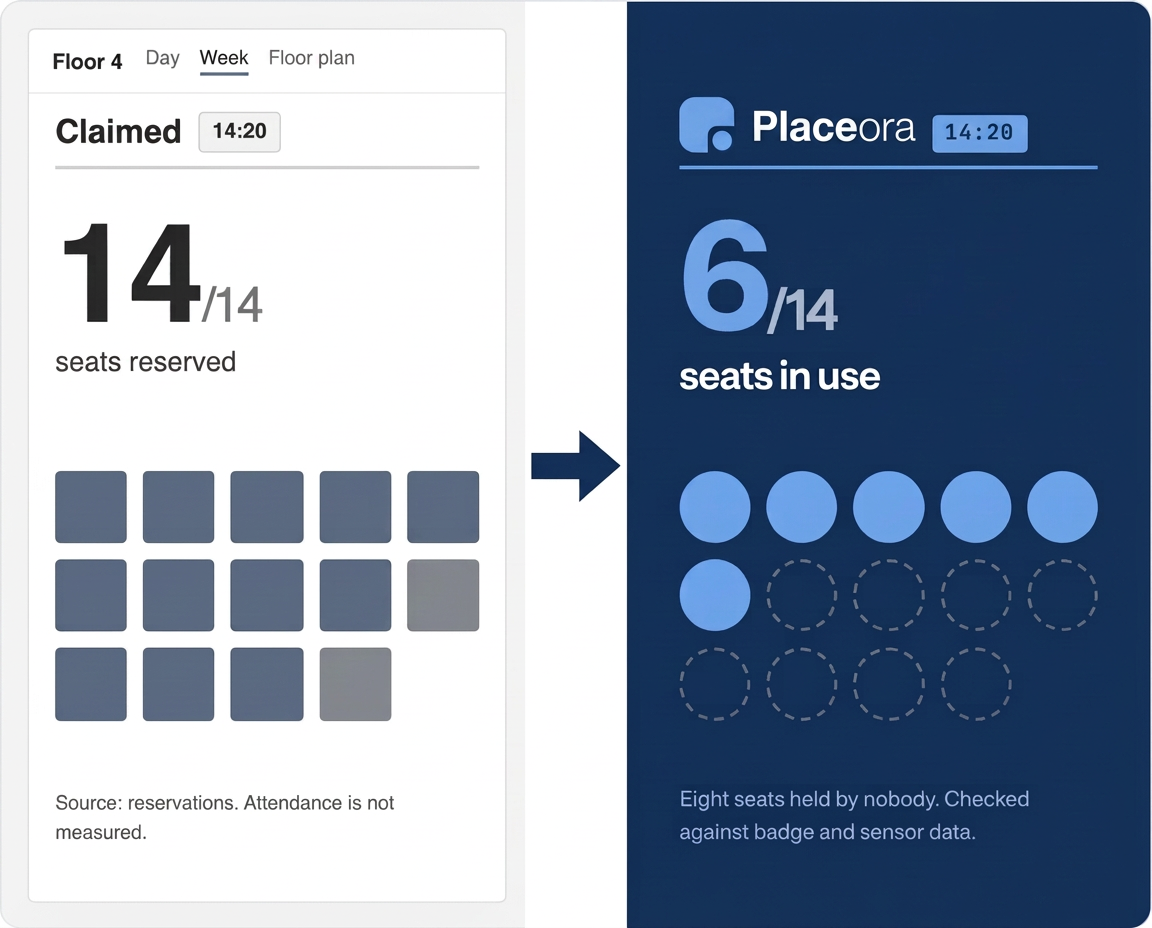
A desk booked on Monday for the whole week, an assigned seat nobody has sat at since spring: the floor plan says full while half the bank is empty. Check-in or sensor data settles which desks are genuinely in use.
Claimed is not occupied
Booked desks, assigned desks and desks left in a recurring series all read as full. Confirmation separates the seats someone took from the seats someone reserved.
Unconfirmed seats come back
No check-in by your cut-off time and the desk releases itself to the pool, so the colleague looking for a seat at 10:00 sees it on the floor plan.
Desk-sharing ratios you can set
Confirmed desk hours per team and per floor tell you how many desks each group needs before you commit to a ratio.
Walk into the audit already holding the evidence
“Compliance reviews and visitor incidents are the #1 trigger for InfoSec buyers to evaluate a new tool.”
tied at 50% each — buyer research
Permissions that prove themselves
Every grant and revoke is checked against what the door actually does. When the record says “revoked” and a badge still opens, you hear about it the same day — not months later in audit sampling.
Visitors stay accounted for
Host, zone and check-out state are confirmed as they happen, so a visitor still on floor three or a contractor outside their cleared area is an alert your team can act on, not a story told afterwards.
Evidence you can hand over
The same loop that ends ghost bookings, pointed at doors and visitors: a check-in, a badge event, an access log — or a sensor where you have one — confirms what was physically true, and keeps a timestamped trail you can export for the review.
One platform for rooms, desks, signage and space data — built for Microsoft users
People book the way they already work — in Outlook, a phone app or on a screen by the door. Facilities and IT get one place to set the rules, and one honest set of numbers on how the office is actually used.
most teams are live within [X] weeks
Meeting room booking
Book rooms, equipment, video connections and catering straight from Outlook or the web — with your own rules on who can book what.
Desk booking
Hot desks and assigned seats on colour-coded floor plans, bookable from a phone app, a desk screen or the calendar.
Digital signage & door signs
Interactive signs outside rooms and at desks show live state and let people book, confirm, extend or end on the spot. Dynamic content screens for the rest of the building.
Visitor management & services
Visitor registration, host notifications and catering or service orders attached to the meeting that needs them.
Verification sources
Check-in on a door sign, badge and access events, calendar accept/decline, or occupancy sensors if you have them — whatever you already have becomes the proof.
Analytics & BI reporting
Dashboards on no-shows, cancellations and hours used per room and desk — the numbers behind real-estate decisions.
100% Microsoft-native, so nothing moves
Bookings stay in Exchange and Microsoft 365, and people keep booking in Outlook — you can also add a room calendar in Outlook and book from there. Placeora syncs availability into those tools rather than asking anyone to move.
- Syncs automatically with Microsoft 365 and Outlook calendars
- Bookings, cancellations and extensions are written back to the Outlook calendar
- Verification from check-ins, badge and access events, calendar responses — or sensors, through their APIs
- Signs supported on iOS, Android and Windows hardware
Hosting, identity and paperwork answered in writing
Hosting location
Hosting region and data-centre details are available on request and agreed in writing before rollout.
GDPR and NIS2
Retention periods, right-to-erasure and breach-notification terms written down, not implied.
SSO via Microsoft Entra ID
Entra ID / Azure AD single sign-on, automated provisioning and role-based access.
ISO 27001 · arriving shortly
No competitor holds it. Penetration-testing cadence and patch policy are available on request.
Support and SLAs
Response and resolution times by severity, with named support channels, set out in the contract.
Stop firefighting, start planning
Most workplace teams spend the day settling double bookings, hunting for a free room for someone standing at reception, and answering complaints they have no data to check. One accurate view of the whole office replaces that.
One view of every floor
Rooms, desks, signs, visitors and service orders in one place — live state, not a stack of calendars.
Conflicts resolve themselves
Unconfirmed bookings release, overruns extend, and the floor plan shows what is genuinely free.
Answers instead of opinions
When someone says there are never enough rooms, you have confirmed hours per room to check it against.
Occupancy numbers you can defend in a board room
The data becomes a real-estate case: a dashboard and BI reporting cover no-shows, cancellations and confirmed hours used per room and desk — which spaces are busiest, which are dead, and how much office you truly need.
trusted by municipalities, hospitals and manufacturers in 40+ countries
Amway · Genesis Housing Association · Ørsted · Wessex Water · UZ Leuven · Sparebanken Vest
Most teams are live within [X] weeks.